


Summary: This blog reveals how virtual machines (VMs) power modern cloud computing with scalability, security, and cost efficiency, plus how Net2Secure delivers high-performance virtual machine hosting for fast, secure, and scalable business growth.
Suppose you walk into a cafe coffee shop to work on your personal laptop. You don’t carry heavy servers, storage devices, or complicated setups. Yet, with just an Internet connection, you can easily access tools, operate applications, store files, and manage the whole project. Have you ever tried to ruminate on how all of this happens so effortlessly?
Well, behind all of this convenience, there’s a silent hero of the digital revolution, which is called Virtual Machines or VMs.
These machines work like smart homes inside a home. They enable cloud hosting providers to allocate one powerful physical server into many smaller, independent computers.
Each VM can run its own operating system, store data, and operate applications, just like a real machine, but without the physical hardware. This simplest idea is what makes cloud computing swift, flexible, and available to everyone, everywhere.
From business launching applications globally to students learning coding from home, VMs make technology accessible, scalable, and cost-effective. In this blog post, you will learn everything about Cloud virtual machines and how they are powering the cloud computing world.
Before going ahead in this post, look at the picture below:
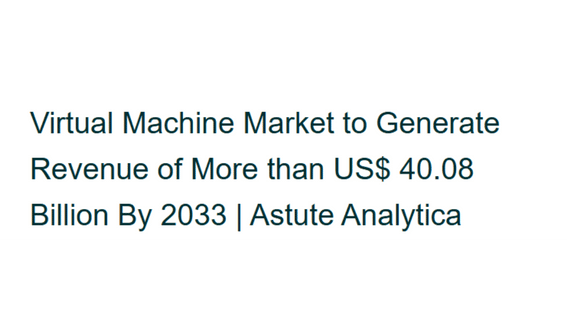
As per the source of Astute Analytica India, the virtual machine market exhibits virtual growth potential driven by quick cloud adoption, improved virtualization technologies, and rising hybrid infrastructure strategies, allowing improved operational performance, security, and resource efficiency.
What is a Virtual Machine?
The term virtual machine (VM) refers to a software-based computer that runs on a physical host system, utilizing virtualization to mimic real hardware and operating systems. It functions in as same way as a real computer, if that computer was actually a program that operates on software compared to hardware. In addition, it also works as a virtual computer system or virtual computer that basically runs on a physical host machine.
A single physical machine can easily host multiple virtual machines, each running independently from the others. However, each virtual machine has its own CPU, RAM, and storage; these computing resources are limited and collectively supplied by the host machine.
How does a Virtual Machine work?
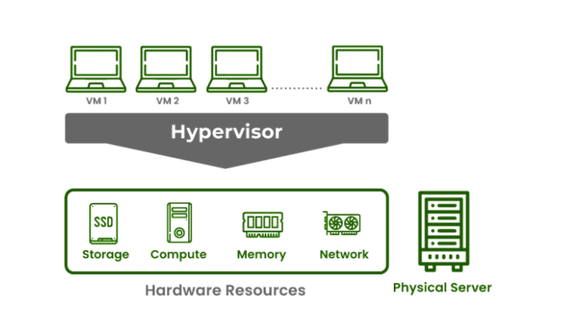
A virtual machine generally prefers virtualization technology to create an isolated version of a physical machine. Each virtual version is known as a Guest and uses the host’s resources, like CPU, memory, and storage.
Thus, a hypervisor is used for resource allocation tasks. The VM operates in an isolated environment with its own operating system and applications, such as a computer.
Pros and Cons of Virtual Machines
| Pros | Cons |
|---|---|
| Several VMs can run on one physical machine, reducing the need for additional hardware and lowering costs. | Operating several VMs on a single host can degrade performance if the hardware is not powerful enough. |
| It supports different operating systems on a single machine, overcoming the physical footprint. | VMs boot more slowly compared to containers because they must load a full operating system. |
| Isolation exceeds reliability; if one VM fails, others remain unaffected. | Handling VMs with different operating system types and configurations can become challenging. |
| Easy to scale by integrating more VMs to distribute workload effectively. | ---- |
| Solid isolation improves security; malware in one VM does not affect others. | --- |
Key reasons for virtual machines in powering today's cloud computing world
- Systematic Use of Physical Resources:Cloud providers have ample servers housed inside the data centers. Without virtualization, each physical machine cloud can only run a single operating system and one application stack. VMs changed that fully. With virtualization, an individual physical server can run multiple virtual machines, each behaving like a fully functional computer.
- Cost Optimization for Business: As the number of customers can share the same physical infrastructure through virtual machines, cloud providers save ample hardware costs. These savings directly benefit users. Instead of buying servers, maintaining them, and paying for electricity and cooling, users can simply rent VM instances and pay only for what they use. This pay-as-you-go model is one of the main reasons cloud adoption has grown so quickly.
- Improved Security Through Isolation: Security is one of the biggest challenges in a shared environment. Each VM is fully separated from the others, so if one VM faces:
- A virus
- A misconfiguration
- A system crash
- Easy Global Deployment:Are you planning to launch an application simultaneously in the US, Europe, or Asia? If so, then it is possible. Virtual machines make it effortless. Cloud providers maintain data centers worldwide. With VMs, they can instantly:
- Duplicate an environment
- Create multiple instances
- Deploy services closer to users
- Foundation for Private, Hybrid & Multi-Cloud Environments
Today’s cloud computing is limited to one environment. Organizations consist, private clouds, public clouds, and on-premises setups. Virtual machines make this hybrid strategy possible. Organizations can shift VMs across environments without compatibility concerns, enabling smooth migration, disaster recovery, and workload balancing.
Why Virtual Machine Security Matters More Than Ever
Virtual machines are created to deliver solid isolation between workloads. If one VM becomes infected with malware or experiences a software failure, the issue is generally contained within that virtual machine without affecting others operating on the same physical server.
However, this isolation is only as safe as the underlying virtualization platform and hypervisor. Current security incidents have demonstrated that attackers are increasingly targeting virtualization layers instead of individual operating systems.
For instance, researchers disclosed a sandbox escape vulnerability affecting Anthropic’s Claude Cowork AI agent on macOS, showing how weakness in virtualized environments can potentially enable applications to break out of their intended security boundaries.
Around the same time, security researchers also reported the Linux KVM vulnerability (CVE-2026-53359), which highlighted the risk of virtual machine escape attacks that could enable malicious code running inside a guest VM to compromise the host system if left unpatched.
These incidents do not indicate that virtual machines are inherently insecure. Instead, they emphasize the importance of following security best practices. Organizations using virtual machines should:
- Keep hypervisors and virtualization software updated with the latest security patches.
- Apply operating system and firmware updates regularly.
- Enable network segmentation to isolate sensitive workloads.
- Use multi-factor authentication (MFA) and role-based access control (RBAC) for administrative access.
- Continuously monitor VM activity and maintain detailed security logs.
- Deploy endpoint protection and intrusion detection tools for both host and guest operating systems.
- Perform regular backups and test disaster recovery plans.
Final Thoughts
Undoubtedly, virtual machines have become an integral part of modern cloud computing. It boosts businesses with exceptional flexibility, scalability, and cost-efficiency. Whether it is optimizing infrastructure costs, deploying applications, ensuring security through isolation, or accepting hybrid and multi-cloud models, VMs make it all come true. As organizations continue to transform their IT operations, virtual machines remain the reliable engines driving innovation, performance, and seamless digital transformation.
At Net2Secure, we allow you to harness the full power of virtualization with solid cloud solutions solely designed for speed, security, and scalability. Our team offers high-performance VM hosting, strong infrastructure management, and enterprise-grade security. No matter if you are a startup, SME, or enterprise, Net2Secure helps you to build, deploy, and scale applications hassle-free in a virtualized environment.


.png)